AI your team can share, your clients can trust, and your finance team can read.
Parlé is a shared AI workspace for your whole team. Every project keeps its own context, budget and expense code, so client work stays separate, the trail of how it was delivered stays with the team, and AI cost lands on the engagement that caused it.

Four problems every firm using AI on client work runs into
01
Teams delivering together
Share prompts and context, and get feedback while the work is still moving.
02
Client data kept apart, and on the record
No bleed between projects, a clear trail of how work was delivered, and nothing lost when someone leaves.
03
Spend you can attribute
Every model's cost on the project it served, in a form finance can use.
04
The right model, not the dearest one
Your keys or our hosted models, with routing that stops everything defaulting to the top tier.
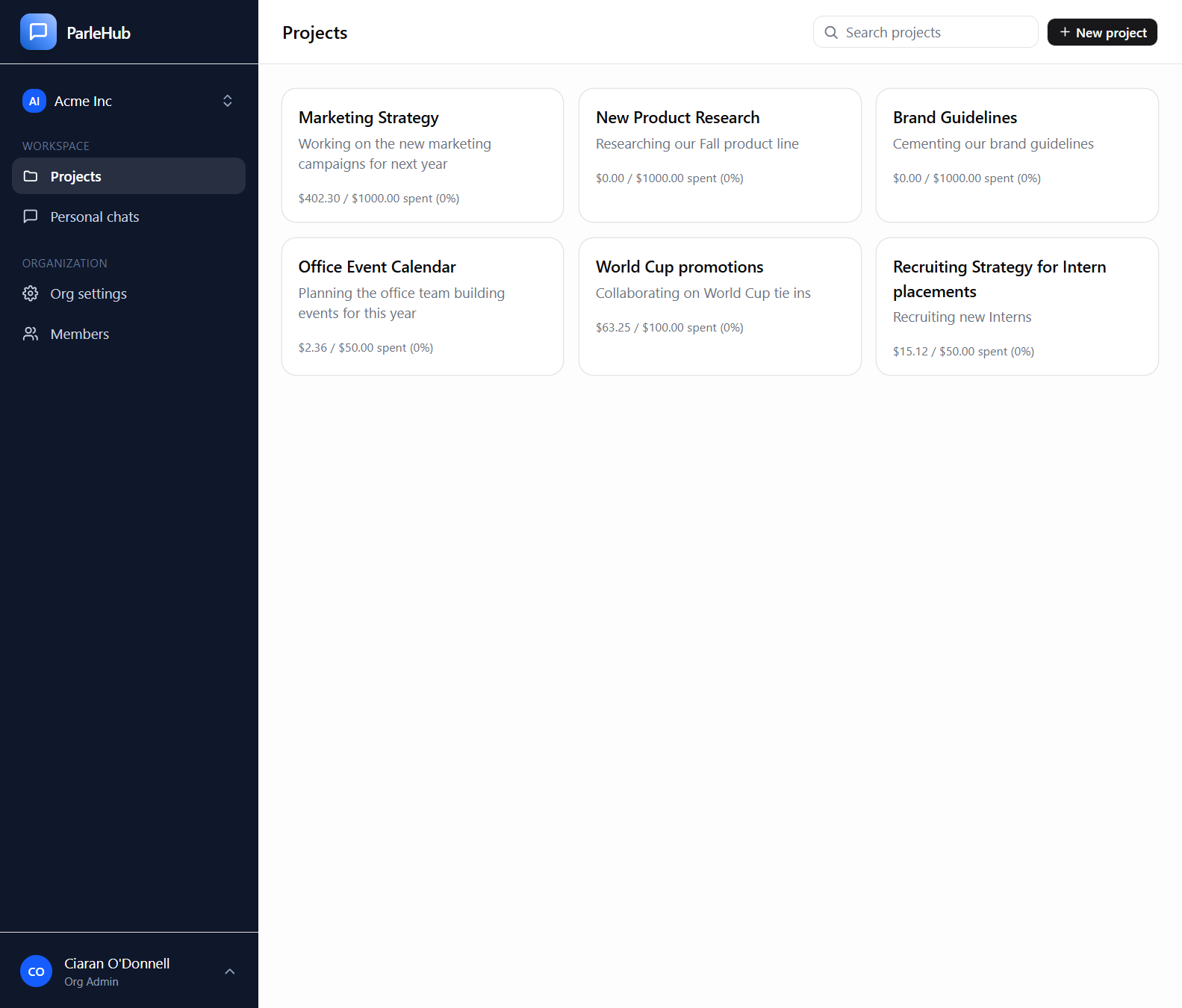
Deliverables are built by teams. Your AI should not be a private tab.
Prompts, context and corrections end up in one person's chat history. A reviewer cannot see how an answer was reached, and a colleague starts again from nothing.
- check_circle Shared project threads every member sees live, with presence for who is viewing, typing or waiting on a reply
- check_circle Prompts and context stay in the project. Promote a personal chat into a shared one when it turns out to matter
- check_circle Instant feedback: a teammate joins the thread mid-answer, or branches by editing and resending without losing the original
-
check_circle
In Microsoft Teams: @mention Parlé in a connected channel and the answer lands in the thread, under the same access rules
-
check_circle
Research Tasks: hand over a brief, acceptance criteria and a spending limit, and get a written deliverable back
-
check_circle
Live Artifacts: a shared project view, built once, that stays current without a model call each time it is opened
Microsoft Teams, Research Tasks and Live Artifacts are on Business Elite and Enterprise plans. Research Tasks and Live Artifacts are managed features that run on models we host.
Client A's context should never turn up in Client B's answer.
Personal AI accounts mix everything. Nobody can say which client's documents went where, and when a colleague leaves, what they worked out leaves with them.
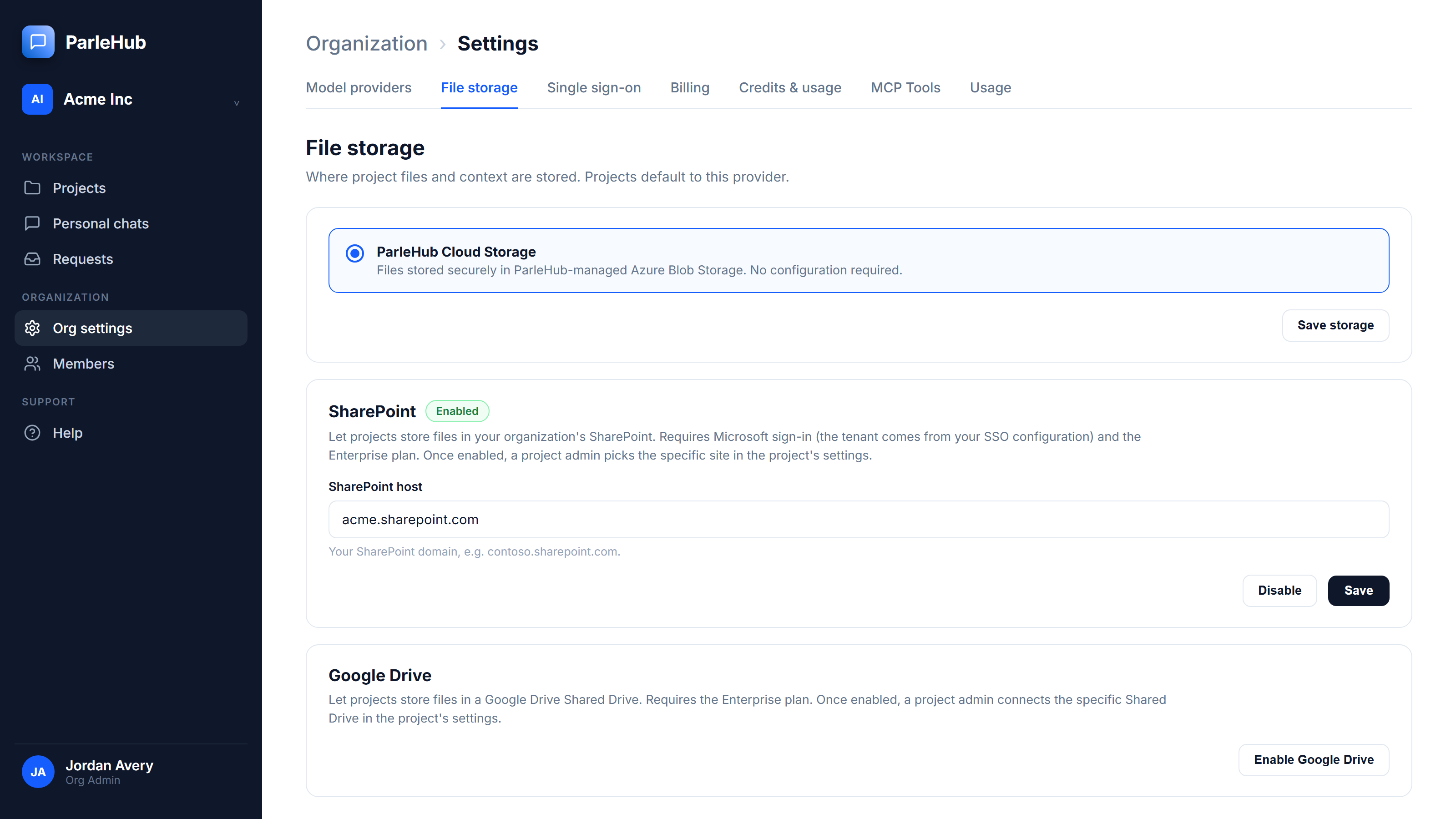
- check_circle Each project is its own boundary, with its own threads, files, budget and code. A conversation draws on its own project, not on another client's
- check_circle Project files can live in your own SharePoint site or Google Shared Drive, so they never leave your tenant
- check_circle Entra ID and Google Workspace sign-in, four role levels, and restricted projects only their members can see
- check_circle The work belongs to the project, not an account. When someone rolls off, their threads, files and ledger entries stay
- check_circle The whole exchange is kept: the question, the reply, the tool calls against project files, and which model produced it
- check_circle Sensitive actions go in an audit log enforced append-only at the core platform level
The only org-wide material is a firm library you choose to publish, and any project can opt out of it.
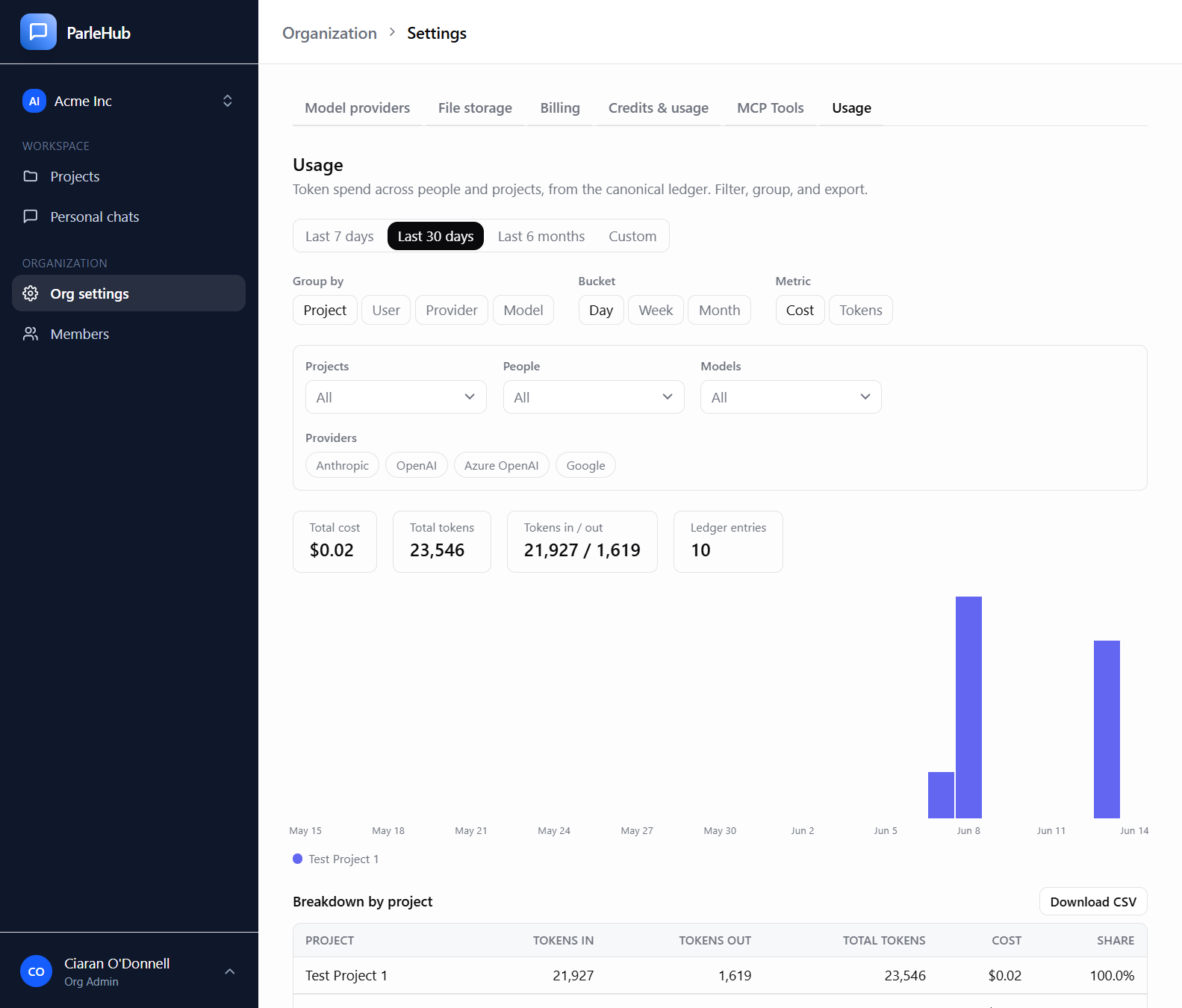
Know what AI cost, which project it served, and what it delivered.
Your people book hours to a client. Your AI books nothing. It arrives as one provider invoice with no client on it, and lands in overhead.
- check_circle A budget scoped to the project, because your people work across several of them, with pre-flight enforcement before a send exceeds it and an 80% warning
- check_circle Spend for every model, whether on your own keys or ours, on one canonical token ledger
- check_circle Your own expense code on every project, carried through to the CSV export, so operations and finance reconcile without a manual join
- check_circle Usage by project, person, provider or model, over any range
- check_circle Personal and org-wide caps as backstops, and a one-click increase request routed to an admin when someone is blocked
- check_circle Teams answers, Research Tasks and artifact building land in the same ledger, on the same project
The ceiling becomes a number you set rather than one you discover, and there is always a path through it.
Use the models you choose, and stop defaulting to the dearest one.
There are two ways in, and you can run both. Governance is the same either way.
-
check_circle
Bring your own keys for Anthropic, OpenAI, Google Gemini, Google Vertex AI or Azure OpenAI. Spend lands on your own provider contract
-
check_circle
Or use models we host, with no provider account, charged by what you use. The hosted set reaches open-weight models you would not otherwise have a contract for
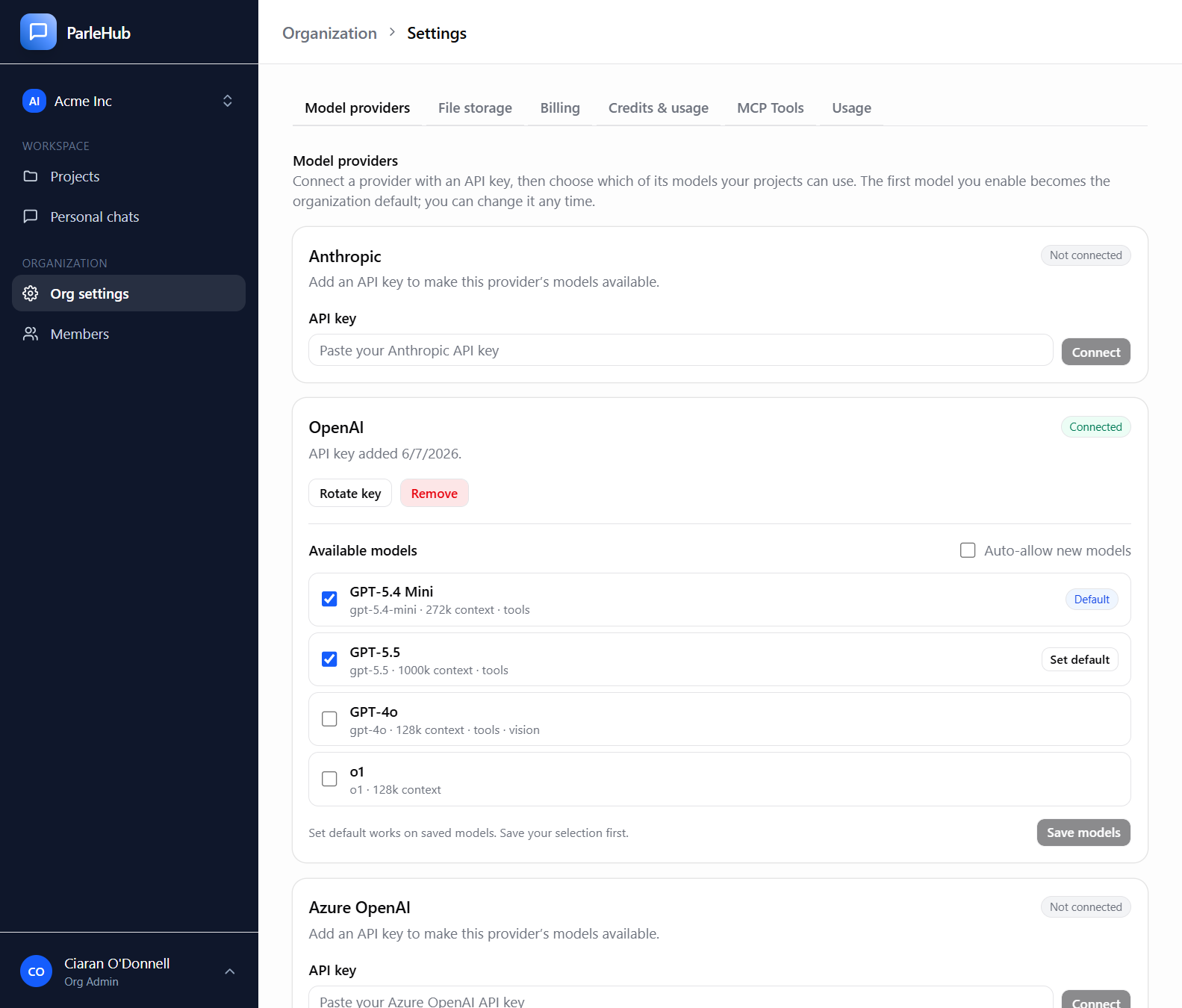
- check_circle Curate which models each project may use, and switch model mid-conversation
-
check_circle
Auto routing: your organization names its Everyday, Standard and Frontier models, and Auto picks one when a conversation starts, so routine questions are not answered by the most expensive model by default
- check_circle Not happy with an answer? Retry it with a stronger model in one click, or ask for Deep on a single message
Auto routing is available on Business plans and above.
We would rather you spent less per deliverable.
Model providers earn when you use more tokens, and so do pure token resellers. Both are rewarded for tokenmaxxing. Parlé is built around your own keys and priced per seat, for the workspace, the budgets, the attribution and the audit trail. We are rewarded for valuemaxxing: more finished work for every dollar of model spend.
- check_circle Bring your own keys and the token bill never passes through us. Managed models are a convenience, charged by what you use, on the same ledger and under the same caps
- check_circle Auto routing keeps routine questions off the top-tier model
- check_circle A Live Artifact costs no model call to open, however many people look
- check_circle A Research Task starts writing up at 85% of the limit you set, instead of running on
Three new ways to deliver work
Parlé in Microsoft Teams
Mention Parlé in a connected channel and get an answer grounded in the project, under the same budget and access rules.
Read the announcement travel_exploreResearch Tasks
A goal, criteria, a due date and a spending limit in. A written deliverable out.
Read the announcement dashboardLive Artifacts
Shared project views that read current data from your tools, and cost no tokens to open.
Read the announcementBuilt for the person who fills in the security questionnaire
Enterprise SSO, files that never leave your own tenant, and an append-only audit trail that Org Admins on Business and above can read and export.
Enterprise SSO
Microsoft Entra ID & Google Workspace
Native storage
SharePoint & Google Drive, in your tenant
Append-only audit log
Enforced at the core platform level; readable and exportable by Org Admins on Business and above
Role-based access
Org admin, project admin, and member roles
Priced per seat. Model spend is separate and yours to cap.
Team
$6 per seat per month
10 seats, 10 projects, Enterprise SSO.
Business
$12 per seat per month
10-seat minimum. Unlimited projects, private projects, SharePoint or Google Drive storage, Auto routing.
Business Elite
$38 per seat per month
20-seat minimum. Adds Research Tasks, Live Artifacts, Microsoft Teams and organization knowledge.
Enterprise
Custom
50-seat minimum. Everything in Business Elite, plus extra compliance and integration options.